

Introduction
FIX Introduction
This document details the Financial Information eXchange (FIX) protocol used by the Ripple Crypto trading. Ripple uses FIX protocol to stream (Taker API), retrieve (Maker API) prices, and handle orders with a counterparty, referred to generically in this document as the “Client”.
To communicate with Ripple via the FIX protocol, there must be IP connectivity between Ripple and the Client, and the Client must initiate the connection. The Client must support the FIX 4.4 or FIX 4.2 protocol to communicate properly with Ripple.
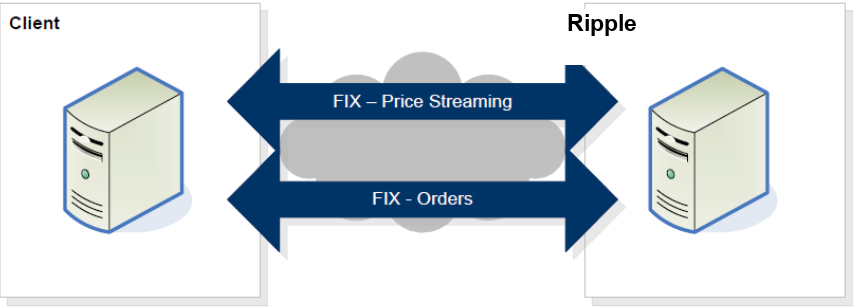
The diagram below presents a high-level overview of the FIX-based FX electronic dealing
architecture.
Ripple provides two FIX sessions for interaction with Clients. The first session is specifically for price communication and the second is for trading. Clients need to ensure that the appropriate session is used when messages are sent to Ripple.
This document defines the Ripple FIX API for sending out market prices, receiving orders and providing trading execution notifications via the Ripple FIX gateway
- The FIX gateway is accessible with an OpenVPN connection.
- There are two interfaces: FIX Market data (price) and FIX Trading (orders).
- FIX Trading and Fix Market data require a valid SenderCompId, login, and password specified in the Logon message.
- The protocol is based on FIX protocol 4.4 FIX protocol 4.4. Refer to FIX 4.4 documentation if there is no tag information specified.
- FIX 4.2 is also supported, but is more limited and less recommended
- The FIX gateway supports a subset of messages and tags listed in this document.
- Price is represented in natural value (e.g. 25000.01 for BTC/USD).
FIX Connectivity
- The following are the ways a client can connect to the API:
- Internet over VPN
- VPN connectivity is routed to the nearest geographical instance - New York, London, or Singapore.
- Access to the platform has to go through SSL encrypted TCP connection over the Internet. If needed, Ripple can provide all necessary keys and certifications.
- Only one market and trade connection per client is supported.
FIX Session Time
- The session will be up the full week with a 3-minute scheduled restart on a weekly basis every Sunday. The exact time for restart will be scheduled with the client.
- StartDay=Sunday
- EndDay=Sunday
- StartTime=07:03:00
- EndTime=07:00:00
FIX Sessions
- The Ripple trading interface supports the two types of orders
- Limit
- Market
- The Ripple trading interface supports the following Time in force (TIF):
- IOC - Immediate or Cancel
- FOK - Fill or kill
- Market - Best attempt at market price
FIX Post Trade
For clients or partners requiring a post-trade message (supported only for Taker API), and that can code to the Ripple FIX API the following Trade Capture Report (AE) message will be sent. In addition, in the event of a communication breakdown, the client can send a “Request Trade Capture Report” message and include in it all the Order IDs for which they want to verify if a trade was created or not.
FIX Messages, Products and Support
- The API supports the following:
- FIX version 4.4 (recommended) and 4.2
- Single session or Dual session.
- Product type - Spot trading only.
- Assets - any crypto coin and FIAT currency are supported. Limitations on what Assets are allowed are defined in the application and business agreement.
- For FIX 4.2 and FIX 4.4 dual sessions - if we receive a message on the wrong session- it will be rejected. In addition, FIX 4.2 doesn’t support all message types.
FIX Duplicate check (recovery)
Taker API
There is always a possibility of duplicate trades being sent out. For example due to a network disconnection. The client is expected to be able to identify duplicate trades and reject them, by using the tag OrderID (37) with the combination of tags PossDupFlag (43) or OrigSendingTime (122).
Maker API
Gap-fill (recovery) for Maker API is disabled by default to prevent sending out old orders that are no longer relevant. In case a Resend Request (35=2) from the maker side is sent: we will reply with Sequence Reset (35=4) and the latest NewSeqNo (36).
We can enable Gap-fill but it is not recommended.
FIX Header and Trailer
The following defines the FIX messages standard header and trailer.
Header
| Tag | Name | Mandatory |
|---|---|---|
| 8 | BeginString | Y |
| 9 | BodyLength | Y |
| 34 | MsgSeqNum | Y |
| 35 | MsgType | Y |
| 49 | SenderCompID | Y |
| 50 | SenderSubID | Y |
| 52 | SendingTime | Y |
| 56 | TargetCompID | Y |
| 43 | PossDupFlag | N |
| 122 | OrigSendingTime | N |
Trailer
| Tag | Name | Mandatory |
|---|---|---|
| 10 | CheckSum | Y |
Websocket API Introduction
Ripple websocket provides two websocket session for communication.
- Market session - used for market data subscription requests and streaming prices.
- Trade session - used for sending orders and receiving execution reports.
Market and Trade session require valid login, server identifier, client identifier and password(used only for hashing) for authentication.
Websocket API Connectivity
- Only one market and trade connection per client supported, on new connection previous connection will be dropped.
- When the trade session goes down market data feed will not be consumed (Maker API) even if the market session is connected. Market data snapshot consumption will resume after the trade session is reconnected.
- Both market and trade session needs to be authenticated before any requests can be made.
- To keep alive both the market and trade session, the client needs to send a ping message every 30 seconds.
Websocket API Sessions
The Ripple market websocket session supports the following subscription type:
- Snapshot
The Ripple market websocket session supports the following book type:
- Spot
The Ripple trading websocket session supports the two types of orders
- Limit
- Market
The Ripple trading websocket session supports the following Time in force (TIF):
- IOC - Immediate or Cancel
- FOK - Fill or kill
Environments
Ripple offer a UAT environment for client testing along with the Production environment.
Production
When onBoarding is done, Ripple will issue all the credentials necessary to connect to the production environment.
UAT
Ripple User Acceptance Testing (UAT) environment provides full trading capabilities allowing you to test any part of the Taker and Maker API
for Both FIX and WebSocket Protocol.
Please note that your experience in UAT environments may differ slightly from that of the current production implementation and undergoes regular maintenance.
Please contact us to start onBoarding and receive the necessary credentials to login.
Once your UAT account has been set up, we will provide you a URL linke to be able to start and stop your environment on demand.
FIX Taker API
Logon
FIX 4.4 Client -> Ripple
This message is sent to initiate a FIX session and establishes the communication session, authenticates the connecting client, and initializes the message sequence number.
8=FIX.4.4|9=79|35=A|49=cc11|56=cs1|34=1|52=20221031-07:40:55|98=0|108=20|553=User1|554=123456|10=034|
FIX 4.4 Ripple -> Client
8=FIX.4.4|9=62|35=A|34=1|49=cs1|52=20221031-07:40:55.074|56=cc11|98=0|108=20|10=039|
FIX 4.2 Client -> Ripple
8=FIX.4.2|9=58|35=A|49=cc21|56=cs1|34=1|52=20221031-07:41:49|98=0|108=20|10=102|
FIX 4.2 Ripple -> Client
8=FIX.4.2|9=62|35=A|34=1|49=cs1|52=20221031-07:41:50.005|56=cc21|98=0|108=20|10=028|
| Tag | Name | Mandatory | Description |
|---|---|---|---|
| 35 | MsgType | Y | A |
| 98 | EncryptMethod | Y | Y |
| 108 | HeartBtInt | Y | Y |
| 141 | ResetSeqNumFlag | N | Indicated that both parties of the FIX Session should reset their sequence numbers |
| 553 | Username | Y | Available only in FIX 4.4 |
| 554 | Password | Y | Available only in FIX 4.4 |
Heartbeat
This message is sent during periods of application inactivity to ensure connection validity. The receiving party should always respond with a heartbeat message.
| Tag | Name | Mandatory | Description |
|---|---|---|---|
| 35 | MsgType | Y | 0 |
| 112 | TestReqID | N | Required only when the heartbeat is in response to a Test Request Message |
Test Request
This message is used to verify connectivity and synchronize sequence numbers. A test request should be responded to with a heartbeat from the recipient
| Tag | Name | Mandatory | Description |
|---|---|---|---|
| 35 | MsgType | Y | 1 |
| 112 | TestReqID | Identifier to be returned in Heartbeat response |
Logout
This message signals the normal termination of the trading session. A session terminated without a Logout message will be considered an abnormal condition.
| Tag | Name | Mandatory | Description |
|---|---|---|---|
| 35 | MsgType | Y | 5 |
| 58 | Text | N |
Market Data Request
Once the logon process is complete, Market Data Requests can be sent to Ripple. Ripple will respond immediately with either a Market Data Full Refresh (35=W) message or a Market Data Request Reject message (35=Y). Only a single product can be requested in each request. The client will receive both bid and ask prices in a single message. Ripple also supports layers (also known elsewhere as price bands or tiers). Quotes containing bid prices and quantities for all layers are always streamed in the same message, as is the case for quotes containing ask prices and quantities.
This message is used to subscribe/unsubscribe to market data rate information.
FIX 4.4 Client -> Ripple subscribe
8=FIX.4.4|9=99|35=V|49=cc12|56=cs1|34=8|52=20221031-07:43:44|262=1|263=1|264=0|146=1|55=BTC/USD|267=2|269=0|269=1|10=095|
FIX 4.2 Client -> Ripple subscribe
8=FIX.4.2|9=99|35=V|49=cc22|56=cs1|34=3|52=20221031-08:34:43|262=1|263=1|264=0|146=1|55=BTC/USD|267=2|269=0|269=1|10=089|
FIX 4.4 Client -> Ripple Unsubscribe
8=FIX.4.4|9=99|35=V|49=cc12|56=cs1|34=7|52=20221031-08:35:17|262=1|263=2|264=0|146=1|55=BTC/USD|267=2|269=0|269=1|10=097|
FIX 4.4 Client -> Ripple Unsubscribe
8=FIX.4.2|9=99|35=V|49=cc22|56=cs1|34=5|52=20221031-08:34:55|262=1|263=2|264=0|146=1|55=BTC/USD|267=2|269=0|269=1|10=095|
| Tag | Name | Mandatory | Description |
|---|---|---|---|
| 35 | MsgType | Y | V |
| 262 | MDReqID | Y | Unique Market Data Request ID. This will be used in responses by Ripple or by the client to cancel a request. To unsubscribe from market data, the same ID must be sent with tag 263 = 2 |
| 263 | SubscriptionRequestType | Y | 1 – Snapshot + Updates (Subscribe) 2 – Disable Snapshot + Updates (Unsubscribe) |
| 264 | MarketDepth | Y | 0 - Full Book 1 = Top of Book |
| 265 | MDUpdateType | N | 0 - Full refresh |
| 266 | AggregatedBook | N | N - Raw prices may or may not include the liquidity provider names. |
| 267 | NoMDEntryTypes | Y | Number of MDEntryType fields being requested. 2 - bid and offer Note – please make sure to request in tag 269 both Bid and Offer. Request for a single side will be rejected!!! |
| -> 269 |
MDEntryType | Y | Market Data entries types list: 0 - Bid 1 - Offer Repeated field: 269=0, 269=1 |
| 146 | NoRelatedSym | Y | 1 ( we allow only a single asset per subscription) |
| -> 55 |
Symbol | Y | Asset - “BTC/USD” |
| -> 64 |
FutSettDate | N | Value date YYYYMMDD. Currently unused, will be used once forward is supported. |
Market Data Request Reject
FIX 4.4 Ripple -> Client
8=FIX.4.4|9=85|35=Y|34=106|49=cs1|52=20221031-09:03:57.488|56=cc12|58=Duplicate MDReqID|262=1|281=1|10=094|
FIX 4.2 Ripple -> Client
8=FIX.4.2|9=84|35=Y|34=84|49=cs1|52=20221031-08:58:35.817|56=cc22|58=Duplicate MDReqID|262=1|281=1|10=050|
| Tag | Name | Mandatory | Description |
|---|---|---|---|
| 35 | MsgType | Y | Y |
| 262 | MDReqID | Y | The Unique ID of the received market data |
| 281 | MDReqRejReason | N | Reason for rejection 0 - Unknown Symbol 1 - Duplicate MDReqID 2 - Request not supported 3 - Insufficient Permissions |
Market Data Snapshot Full
FIX 4.4 Ripple -> Client
8=FIX.4.4|9=710|35=W|34=8|49=cs1|52=20221031-08:35:11.416|56=cc12|55=BTC/USD|262=1|268=20|269=0|270=202.15|271=0.00000001|269=0|270=202.16|271=0.00000002|269=0|270=202.17|271=0.00000003|269=0|270=202.18|271=0.00000004|269=0|270=202.19|271=0.00000005|269=0|270=202.2|271=0.00000006|269=0|270=202.21|271=0.00000007|269=0|270=202.22|271=0.00000008|269=0|270=202.23|271=0.00000009|269=0|270=202.24|271=0.0000001|269=1|270=202.35|271=0.00000001|269=1|270=202.36|271=0.00000002|269=1|270=202.37|271=0.00000003|269=1|270=202.38|271=0.00000004|269=1|270=202.39|271=0.00000005|269=1|270=202.4|271=0.00000006|269=1|270=202.41|271=0.00000007|269=1|270=202.42|271=0.00000008|269=1|270=202.43|271=0.00000009|269=1|270=202.44|271=0.0000001|10=073|
FIX 4.2 Ripple -> Client
8=FIX.4.2|9=710|35=W|34=3|49=cs1|52=20221031-08:34:44.164|56=cc22|55=BTC/USD|262=1|268=20|269=0|270=202.15|271=0.00000001|269=0|270=202.16|271=0.00000002|269=0|270=202.17|271=0.00000003|269=0|270=202.18|271=0.00000004|269=0|270=202.19|271=0.00000005|269=0|270=202.2|271=0.00000006|269=0|270=202.21|271=0.00000007|269=0|270=202.22|271=0.00000008|269=0|270=202.23|271=0.00000009|269=0|270=202.24|271=0.0000001|269=1|270=202.35|271=0.00000001|269=1|270=202.36|271=0.00000002|269=1|270=202.37|271=0.00000003|269=1|270=202.38|271=0.00000004|269=1|270=202.39|271=0.00000005|269=1|270=202.4|271=0.00000006|269=1|270=202.41|271=0.00000007|269=1|270=202.42|271=0.00000008|269=1|270=202.43|271=0.00000009|269=1|270=202.44|271=0.0000001|10=072|
| Tag | Name | Mandatory | Description |
|---|---|---|---|
| 35 | MsgType | Y | W |
| 262 | MDReqID | Y | The Unique ID of the received market data request |
| 55 | Symbol | Y | e.g “BTC/USD” |
| 268 | NoMDEntries | Y | No. of market data updates in the message |
| -> 269 |
MDEntryType | Y | ‘0’ (Bid) ‘1’ (Offer) |
| -> 270 |
MDEntryPx | Y | Price of entry |
| -> 271 |
MDEntrySize | Y | Quantity of entry |
FIX 4.4 Ripple -> Client
8=FIX.4.4|9=100|35=W|34=268|49=cs1|52=20230619-09:45:58.883|56=cc12|55=ETH/USD|262=1|268=0|10=184|
FIX 4.2 Ripple -> Client
8=FIX.4.2|9=100|35=W|34=268|49=cs1|52=20230619-09:45:58.883|56=cc12|55=ETH/USD|262=1|268=0|10=184|
New Order Single
A new order single message enables the client to send a request for a trade to Ripple. Ripple requires that the ClOrdID <11> be unique.
FIX 4.4 Client -> Ripple
8=FIX.4.4|9=133|35=D|49=cc11|56=cs1|34=113|52=20221031-09:10:46|11=1598950759|21=1|55=BTC/USD|54=1|60=20221031-09:10:46|40=2|44=19123.20|38=100|59=4|10=003|
FIX 4.2 Client -> Ripple
8=FIX.4.2|9=133|35=D|49=cc21|56=cs1|34=113|52=20221031-09:11:04|11=1805964193|21=1|55=BTC/USD|54=1|60=20221031-09:11:04|40=2|44=19123.20|38=100|59=4|10=23
| Tag | Name | Mandatory | Description |
|---|---|---|---|
| 35 | MsgType | Y | D |
| 11 | ClOrdID | Y | Client Order ID – must be unique |
| 1 | Account | N | Client Account name |
| 60 | TransactTime | Y | The transaction timestamp of the orde |
| 15 | Currency | N | The currency or coin unit that represents the quantity |
| 54 | Side | Y | 1 (Buy) 2 (Sell) |
| 55 | Symbol | Y | The Asset - Coin and currency combination, e.g EUR/USD, BTC/USD, ETH/BTC |
| 38 | OrderQty | Y | The order quantity |
| 40 | OrdType | Y | 1 – Market 2 – Limit |
| 44 | Price | N | |
| 59 | TimeInForce | Y | 1 – Good Till Cancel 3 – Immediate or Cancel (Default if no value provided) 4 – Fill or Kill |
| 64 | FutSettDate (FIX 4.2) SettlDate (FIX 4.4) |
N | Value date YYYYMMDD. Required for forward Will be supported in the future. Use FutSettDate if using FIX 4.2 Use SettlDate if using FIX 4.4 |
| 126 | ExpireTime | N | Not supported in phase 1- Required for Good-Till-Date order request. Date and Time of the order expiration specified in YYYYMMDD-HH:MM:SS format. Expressed in GMT. |
| 5006 | BaseChain (custom) | N | Settlement chain for the base asset, e.g. ERC-20 — see Get Available Settlement Chains |
| 5007 | TermChain (custom) | N | Settlement chain for the term asset, e.g. ERC-20 — see Get Available Settlement Chains |
Reject
This message is used by Ripple to reject any message. This can happen if the message doesn’t comply with the FIX dictionary, naming issue, or bad input.
| Tag | Name | Mandatory | Description |
|---|---|---|---|
| 35 | MsgType | Y | 3 |
| 45 | RefSeqNum | Y | Integer value -reference of the rejected order header sequence number MsgSeqNum <34> |
| 371 | RefTagID | N | The tag number of the FIX field being referenced |
| 372 | RefMsgType | N | The message type (35) OF THE Fix message being referenced (e.g “D” for 35=D) |
| 373 | SessionRejectReason | N | Code to identify reason for rejection: 0 = Invalid tag number 1 = Required tag missing 2 = Tag not defined for this message type 3 = Undefined Tag 4 = Tag specified without a value 5 = Value is incorrect (out of range) for this tag 6 = Incorrect data format for value 7 = Decryption problem 8 = Signature <89> problem 9 = CompID problem 10 = SendingTime <52> accuracy problem 11 = Invalid MsgType <35> 12 = XML Validation error 13 = Tag appears more than once 14 = Tag specified out of required order 15 = Repeating group fields out of order 16 = Incorrect NumInGroup count for repeating group 17 = Non "Data" value includes field delimiter ( 99 = Other |
| 58 | Text | N | Error message text |
Execution Report
This message is used to communicate Order Ack, Order Reject, Order Fill and Order Status Responses.
- There are Four possible 35=8 responses to an order
- Ack - 150 =0
- NACK - 150=8
- Fill - partial - 150 =2/F, 39=1
- Fill - full - 150 =2/F, 39=2
For a FOK type order, there are two possible responses – as an example if the order is for 5 BTC/USD
Scenario 1 – FOK – order is not filled - CANCEL
| Sequence | Message |
|---|---|
| Cancel message is provided | Execution report (35=8) ExecType (150=4) OrdStatus (39=4) |
Scenario 2 – FOK – order is fully filled - DONE
| Sequence | Message |
|---|---|
| Full Fill message is provided for 5 BTC | Execution report (35=8) ExecType (150=2/F) OrdStatus (39=2) |
For an IOC type order, there are two additional possible responses in addition to the ones above which may happen in the case of multiple partial fills. We use the OrdStatus tag to indicate if the order is partial or fully complete – as an example if the order is for 5 BTCUSD
Scenario1 – IOC – order is fully filled - DONE
| Sequence | Message |
|---|---|
| Fill message for 2 BTC is provided | Execution report (35=8) ExecType (150=2/F) OrdStatus (39=1) |
| Cancel remaining message is provided for the remaining 3 BTC | Execution report (35=8) ExecType (150=4) OrdStatus (39=1) |
FIX 4.4 Ripple -> Client Ack
8=FIX.4.4|9=197|35=8|34=112|49=cs1|52=20221031-09:10:46.686|56=cc11|11=1598950759|14=0|15=BTC|17=1598950759|32=0|37=A010tlPyxyg|39=0|41=1598950759|44=19123.2|54=1|55=BTC/USD|60=20221031-11:10:46.686|150=0|151=100|10=012|
FIX 4.2 Ripple -> Client Ack
8=FIX.4.2|9=197|35=8|34=113|49=cs1|52=20221031-09:11:04.479|56=cc21|11=1805964193|14=0|15=BTC|17=1805964193|20=0|32=0|37=A010tlPyxyh|39=0|41=1805964193|44=19123.2|54=1|55=BTC/USD|60=20221031-11:11:04.479|150=0|151=100|10=223|
FIX 4.4 Ripple -> Client
8=FIX.4.4|9=228|35=8|34=113|49=cs1|52=20221031-09:10:46.706|56=cc11|6=19123.2|11=1598950759|14=100|15=BTC|17=VuzGNOBG|31=19123.2|32=100|37=A010tlPyxyg|38=100|39=2|41=1598950759|44=19123.2|54=1|55=BTC/USD|60=20221031-11:10:46.706|64=202210304|150=F|151=0|10=153|
FIX 4.2 Ripple -> Client
8=FIX.4.2|9=228|35=8|34=114|49=cs1|52=20221031-09:11:04.480|56=cc21|6=19123.2|11=1805964193|14=100|15=BTC|17=CAfoHyfD|20=2|31=19123.2|32=100|37=A010tlPyxyh|38=100|39=2|41=1805964193|44=19123.2|54=1|55=BTC/USD|60=20221031-11:11:04.480|64=202210304|150=2|151=0|10=136|
| Tag | Name | Mandatory | Description |
|---|---|---|---|
| 35 | MsgType | Y | 8 |
| 1 | Account | N | Counterparty account name, supported only in Direct mode (non prime broker flow) |
| 198 | SecondaryOrderID | N | Counterparty order ID, supported only in Direct mode (non prime broker flow) |
| 527 | SecondaryExecID | N | Counterparty exec ID, supported only in Direct mode (non prime broker flow) |
| 11 | ClOrdID | Y | Client Order ID |
| 37 | OrderID | Y | Ripple unique order ID for the Trade |
| 17 | ExecID | N | Ripple Execution ID. Unique ID in each execution report. case sensitive |
| 20 | ExecTransType | Y - FIX 4.2 N- FIX 4.4 |
Only applicable to Fix 4.2 0= New 1 = Cancel 2 = Correct |
| 150 | ExecType | Y | FIX 4.2 0 = New 1 = Partially Fill 2 = Fill 4 = Canceled 8 = Rejected A = Pending New 9 = Suspended I = Order Status FIX 4.4 0 = New F = Trade (partial fill or fill) 4 = Canceled 8 = Rejected A = Pending New 9 = Suspended I = Order Status |
| 39 | OrdStatus | Y | 0 = New 1 = Partially Fill 2 = Fill 4 = Canceled 8 = Rejected A = Pending New 9 = Suspended |
| 64 | FutSettDate | N | Settlement date for order fills if exists. In YYYYMMDD format (please see comment below regarding the nature of the date) |
| 15 | Currency | N | The currency or coin unit that represents the quantity |
| 40 | OrdType | N | 1 = Market 2 = Limit |
| 54 | Side | Y | 1 (Buy) 2 (Sell) |
| 55 | Symbol | Y | The Asset - Coin and currency combination, e.g. EUR/USD, BTC/USD, ETH/BTC |
| 38 | OrderQty | N | Order quantity specified by the Client. Not present in Order Reject |
| 14 | CumQty | Y | The amount that has been filled so far |
| 6 | AvgPx | N | Average price of all fills on for the order |
| 31 | LastPx | N | Trade price. |
| 32 | LastQty (For Fix4.4) LastShares (For Fix4.2) |
Y | Amount bought or sold on this fill |
| 44 | Price | Y | Order price |
| 151 | LeavesQty | Y | Quantity remaining of this order |
| 60 | TransactTime | Y | The transaction timestamp of the order |
| 103 | OrdRejReason | N | Error code. Present in Order Reject |
| 58 | Text | N | Error message. Present in Order Reject |
| 5006 | BaseChain (custom) | N | Settlement chain of the base asset for this trade, e.g. ERC-20 — see Get Available Settlement Chains |
| 5007 | TermChain (custom) | N | Settlement chain of the term asset for this trade, e.g. ERC-20 — see Get Available Settlement Chains |
Order Cancel Request
This message is used by the client to cancel any live order they may have. Applicable for orders of type GTC.
In case Ripple is unable to cancel the order a Cancel Rejected (35=9) message will be sent as a response.
In case Ripple was able to cancel the order an Execution Report (35=8) with status cancel for OrdStatus and ExecType (39=4, 150=0) will be sent back.
FIX 4.4 Client -> Ripple
8=FIX.4.4|9=109|35=F|49=cc11|56=cs1|34=15|52=20240326-12:50:52|41=1598950759|11=1598950759|55=BTC/USD|60=20240326-12:50:52|37=A010tlPyxyg|10=232|
FIX 4.2 Client -> Ripple
8=FIX.4.2|9=109|35=F|49=cc11|56=cs1|34=15|52=20240326-12:50:52|41=1598950759|11=1598950759|55=BTC/USD|60=20240326-12:50:52|37=A010tlPyxyg|10=232|
| Tag | Name | Mandatory | Description |
|---|---|---|---|
| 35 | MsgType | Y | F |
| 1 | Account | N | Client Account name |
| 11 | ClOrderID | Y | Client Order ID |
| 37 | OrderID | Y | The order ID of the order to be canceled |
| 41 | OrigClOrdID | Y | Client Order ID of Order being replaced |
| 55 | Symbol | Y | The Asset - Coin and currency combination, e.g. BTC/USD |
| 60 | TransactTime | Y | The transaction timestamp of the order cancel request |
Cancel Rejected
This message is used by Ripple to reject a cancel order message. This can happen if the order is already filled or is in the process of getting filled.
FIX 4.4 Ripple -> Client
8=FIX.4.4|9=112|35=9|34=44|49=cs1|52=20240326-12:23:27.864|56=cc21|11=1598950759|37=A010tlPyxyg|39=8|41=1598950759|102=99|434=1|10=134|
FIX 4.2 Ripple -> Client
8=FIX.4.2|9=112|35=9|34=44|49=cs1|52=20240326-12:23:27.864|56=cc21|11=1598950759|37=A010tlPyxyg|39=8|41=1598950759|102=99|434=1|10=134|
| Tag | Name | Mandatory | Description |
|---|---|---|---|
| 35 | MsgType | Y | 9 |
| 11 | ClOrderID | Y | Client Order ID |
| 37 | OrderID | Y | The order ID of the order to be canceled |
| 39 | OrderStatus | Y | 8=Rejected Status of the order cancel request |
| 41 | OrigClOrdID | Y | Client Order ID of Order being rejected |
| 434 | CxlRejResponseTo | Y | 1 – Order Cancel Request 2 – Order Cancel/Replace Request |
| 102 | CxlRejReason | N | 1 – Order Cancel Request 2 – Order Cancel/Replace Request |
| 58 | Text | N | Error message |
| 60 | TransactTime | Y | The transaction timestamp of the order cancel request |
Trade Capture Report
Used to report a trade between counterparties.
FIX 4.4 Ripple -> Client
8=FIX.4.4|9=239|35=AE|34=2|49=cs1|52=20221031-09:43:02.535|56=cc11|17=s1|31=1234.56|32=0.00025|55=BTC/USD|60=20221030-10:10:28.629|75=20190824|150=F|487=0|568=HjdFFY13|571=A010tlPGF9S|748=1|912=Y|552=1|54=1|37=s3|11=123546|453=1|448=1|447=C|452=17|15=BTC|10=031
| Tag | Name | Mandatory | Description |
|---|---|---|---|
| 35 | MsgType | Y | AE |
| 571 | TradeReportID | Y | ID for this message |
| 60 | TransactTime | Y | The transaction timestamp of the order UTC |
| 487 | TradeReportTransType | Y | 0-New |
| 75 | TradeDate | Y | Trade date in YYYYMMDD format. We use the creation date based on Transact time UTC |
| 568 | TradeRequestID | N | Request ID if the Trade Capture Report |
| 748 | TotNumTradeReports | N | Number of trade reports returned - if this report is part of a response to a Trade Capture Report Request |
| 912 | LastRptRequested | N | Indicates if this is the last report in the response to a Trade Capture Report Request |
| 150 | ExecType | N | F - Trade |
| 55 | Symbol | Y | The Asset - Coin and currency combination, e.g. EUR/USD, BTC/USD, ETH/BTC |
| 31 | LastPx | Y | Price of the last fill. Only present in Fill report |
| 32 | LastQty | Y | Amount bought or sold on this fill |
| 17 | ExecID | N | Ripple Execution ID. Unique ID in each execution report |
| 527 | SecondaryExecID | N | Counterparty exec ID, supported only in Direct mode (non prime broker flow) |
| 5004 | IsDealTrade (custom) | N | Y when the trade originated from the Deal Entry flow |
| 5005 | IsPreExec (custom) | N | Y when the trade is a pre-execution trade |
| 5006 | BaseChain (custom) | N | Settlement chain of the base asset for this trade, e.g. ERC-20 — see Get Available Settlement Chains |
| 5007 | TermChain (custom) | N | Settlement chain of the term asset for this trade, e.g. ERC-20 — see Get Available Settlement Chains |
| 552 | NoSides | Y | Number of sides |
| 54 | -> Side |
Y | Trading Party |
| 11 | -> ClOrdID |
Y | Order ID of the Trading party |
| 37 | -> OrderID |
Y | Ripple unique order ID for the Trade |
| 15 | -> Currency/Coin |
N | Identifies currency or coin used for price |
| 1 | -> Account |
N | Counterparty account name, supported only in Direct mode (non prime broker flow) |
| 40 | -> OrdType |
N | 1 = Market 2 = Limit |
| 198 | -> SecondaryOrderID |
N | Counterparty order ID, supported only in Direct mode (non prime broker flow) |
| 453 | -> NoPartyIDs |
N | Number of parties |
| 448 | ->-> PartyID |
N | ID of the counterparty |
| 447 | ->-> PartyIDSource |
N | C – Generally accepted market participant |
| 452 | ->-> PartyRole |
N | The role of the party 17 – Contra Firm (the counterparty) |
Request Trade Capture Report
In the event of a communication breakdown, or any other prerogative the client can send a “Request Trade Capture Report” message and include in it the Order Id for which they want to verify if a trade was created or not using ClOrdID <11>. The system will respond with AE drop copy messages for all created trades. Please note – an Order (if not of type FOK) may result in several trades and may be partially filled. The system will respond with all trades related to an order.
FIX 4.4 Client -> Ripple
8=FIX.4.4|9=76|35=AD|49=cc11|56=cs1|34=3|52=20221031-09:43:02|568=HjdFFY13|569=1|11=123546|10=182|
| Tag | Name | Mandatory | Description |
|---|---|---|---|
| 35 | MsgType | Y | AD |
| 568 | TradeRequestID | Y | Identifier of the trade request |
| 569 | TradeRequestType | Y | 1 = Matched trades matching Criteria provided on request (parties, exec id, trade id, order id, instrument, input source, etc.) |
| 11 | ClOrdID | Y | Unique identifier for Order as assigned by the client. |
Trade Capture Report Request Ack
Indicate that no trades were found that matched the selection criteria specified on the Trade Capture Report Request (AQ).
- No Trade - In this case the AQ msg is provided with Tag 750 =1 (Completed).
- In the event that system is unable to provide a response the AQ msg is provided with Tag 750=2 (Rejected) and a reason will be provided in Tag 58
- In the event the order has been “Timed Out” the AQ msg is provided with Tag 750=0 and a reason will be provided in Tag 58 “Time out”. In this case you can continue every 5 seconds to retry the Trade capture request (AD) until a final response is received.
FIX 4.4 Ripple -> Client
8=FIX.4.4|9=88|35=AQ|34=2|49=cs1|52=20221031-09:51:41.171|56=cc11|568=HjdFFY13|569=1|748=0|749=0|750=0|10=230
| Tag | Name | Mandatory | Description |
|---|---|---|---|
| 35 | MsgType | Y | AQ |
| 568 | TradeRequestID | Y | Identifier of the trade request |
| 569 | TradeRequestType | Y | Type of trade capture report: 1 = Matched trades matching Criteria provided on request (parties, exec id, trade id, order id, instrument, input source, etc.) |
| 748 | TotNumTradeReports | N | Number of trade reports returned - if this report is part of a response to a Trade Capture Report Request |
| 749 | TradeRequestResult | Y | Result of trade request. Valid values: 0 = Successful (Default) 1 = Invalid or unknown instrument 2 = Invalid type of trade requested 3 = Invalid parties 4 = Invalid Transport Type requested 5 = Invalid Destination requested 8 = TradeRequestType <569> not supported 9 = Unauthorized for Trade Capture Report Request 99 = Other |
| 750 | TradeRequestStatus | Y | Status of trade request. Valid values 0 = Accepted 1 = Completed 2 = Rejected |
| 58 | Text | N | Free text |
Order Status Request
The Order Status Request message is used by the client to generate an order status message and get details about it.
- If information exists client will receive an Execution Report message with the order status and order information.
- If information is missing client will get a Business Message Reject with the reject reason.
FIX 4.4 Client -> Ripple
8=FIX.4.4|9=90|35=H|49=cc11|56=cs1|34=16|52=20240902-08:40:11|55=BTC/USD|54=1|37=223456OID|11=223456COID|10=168
FIX 4.2 Client -> Ripple
8=FIX.4.2|9=90|35=H|49=cc11|56=cs1|34=16|52=20240902-08:40:11|55=BTC/USD|54=1|37=223456OID|11=223456COID|10=168
| Tag | Name | Mandatory | Description |
|---|---|---|---|
| 35 | MsgType | Y | H |
| 37 | OrderID | Y | Unique identifier for Order as assigned by Ripple on the ER (35=8) ack |
| 11 | ClOrdID | Y | Unique identifier for Order as assigned by Client on the NOS (35=D) |
| 55 | Symbol | Y | |
| 54 | Side | Y |
Error Code
| Text | Comments |
|---|---|
| Market Data Request (35=V) | |
| Unsupported MDEntryType | Unknown side |
| Only Bid and Offer subscription allowed | |
| Unsupported MDEntryType, only two side are allowed | Only Bid and Offer subscription is allowed |
| Unknown symbol | |
| Symbol has an active subscription | Duplicate symbol subscription |
| Duplicate MDReqID | |
| Unsupported SubscriptionRequestType | Tag 263 |
| Order Status Request (35=H) | |
| Was unable to locate data for order ID | |
| Unknown order ID | |
| Server ERROR | |
| New Order Single (35=D) | |
| SetTimeInForce, not supported | |
| SetTimeInForce, is missing | |
| OrderQty must be greater than zero | |
| Missing OrderQty | Amount is missing |
| Price must be greater than zero | |
| Missing Price | |
| Execution Report (35=8) | |
| Term currency allowed only with FOK time in force | For term orders, only TIF FOK is allowed |
| Term currency does not support the instrument | Instrument is not supported for term orders |
| Order rejected due to being received late probably due to network latency | Order latency issue |
| Order throttling exceeded | Order rate limit |
| Possible duplicate orders are not supported (validated by tag 43) | Duplicate order was sent |
| Possible duplicate orders are not supported (validated by tag 122) | Duplicate order was sent |
| Order has exceeded the allowed amount of resting orders per instrument | Exceeded the amount of allowed resting orders (TIF:GTC, GTD) |
| Amount is smaller than instrument defined minimum amount of ... | Order amount it too small |
| Amount increment is out of range. increment value for instrument | Order amount increment is wrong |
Websocket API Signature
Signature needs to be generated at the time of login request. It can be generated using the following steps:
- Generate a string by concatenating password and constant string "/verify"
- Signature would be Base64 encoded hash of the above string generates using HMAC SHA256 algorithm.
Java code sample
import javax.crypto.Mac;
import javax.crypto.spec.SecretKeySpec;
import java.util.Base64;

public class SignatureDemo {

  public static String getSign(String passPhrase, long timeStamp) {
    try {
      String stringToHashAndEncode = timeStamp + "/verify";
      Mac sha256HMAC = Mac.getInstance("HmacSHA256");

      SecretKeySpec secretKeySpec = new SecretKeySpec(passPhrase.getBytes(), "HmacSHA256");
      sha256HMAC.init(secretKeySpec);
      String hash = Base64.getEncoder().encodeToString(sha256HMAC.doFinal(stringToHashAndEncode.getBytes()));
      return hash;
    } catch (Throwable t) {
      return null;
    }
  }

  public static void main(String[] args) {
    String signature = getSign("UfawYizemLAHMyAezkYQqLtQ3uJ9UQaXXJg6vrvL", System.currentTimeMillis());
    System.out.println("Signature : " + signature);
  }
}
Python Example
  import hashlib
  import hmac
  import base64

  string_to_hash_and_encode = timeStamp + "/verify"
  hash_obj = hmac.new(secret_key, message, hashlib.sha256)
  hash_value = base64.b64encode(hash_obj.digest()).decode("utf-8")
shell Example
getSign() {
    local passPhrase=$1
    local timeStamp=$2

    local stringToHashAndEncode="${timeStamp}/verify"
    local hash

    hash=$(echo -n "$stringToHashAndEncode" | openssl dgst -sha256 -hmac "$passPhrase" -binary | base64)
}

# Example usage:
passPhrase="UfawYizemLAHMyAezkYQqLtQ3uJ9UQaXXJg6vrvL"
timeStamp="1695616595908"

result=$(getSign "$passPhrase" "$timeStamp")
echo "Result: $result"
Websocket Taker API
Login
Client -> Ripple.
Both market and trade session needs to be authenticated before any requests can be made.
Request parameters
Request
{
  "op": "logon",
  "arg": {
    "apiKey": "User1",
    "sign": "7L+zFQ+CEgGu5rzCj4+BdV2/uUHGqddA9pI6ztsRRPs=",
    "server": "cs1",
    "client": "cc11"
  },
  "ts": 1667835722651
}
| Parameter | Type | Required | Description |
|---|---|---|---|
| op | String | Yes | Operation logon |
| arg | Object | Yes | Login details |
| -> apiKey |
String | Yes | API Key |
| -> sign |
String | Yes | |
| -> server |
String | Yes | Server id |
| -> client |
String | Yes | Client id |
| ts | Long | Yes | Unix epoch time |
Response
Success Response
{
  "op": "logon",
  "arg": {
    "code": 0
  },
  "ts": 1682346263287
}
Error response
{
  "op": "logon",
  "arg": {
    "code": 50104,
    "errMsg": "Invalid credentials"
  },
  "ts": 1682346263287
}
| Parameter | Type | Required | Description |
|---|---|---|---|
| op | String | Yes | Operation logon |
| arg | Object | Yes | Login details |
| -> code |
Integer | Yes | 0 - success non zero for failure |
| -> errMsg |
String | no | Error message, populated only in case of error |
| ts | Long | Yes | Unix epoch time |
Ping
Client -> Ripple.
To keep the connection alive client needs to send a heartbeat message ping once every 30 seconds. If no heartbeat message is received for 30 seconds connection will be dropped.
Rate limit : 1 request per 15 seconds Connection dropped in case of rate limit breach.
Request
{
  "op": "ping"
}
Response
{
  "op": "ping"
}
Request parameters
| Parameter | Type | Required | Description |
|---|---|---|---|
| op | String | Yes | Operation ping |
Subscribe
Client -> Ripple.
Client will subscribe to desired instruments to be able to retrieve a stream of market data.
Request Example
{
  "op": "subscribe",
  "arg": {
    "instrument": "BTC/USD",
    "side": "BOTH",
    "subscriptionId": "FhervfD",
    "quantity" : 0,
    "subscriptionRequestType": "snapshot",
    "typeBook": "SPOT",
    "aggBook": 0,
    "marketDepth":0
  },
  "ts": 1667835722651
}
Request subscribe RFQ
{
  "op": "rfqsubscribe",
  "arg": {
    "instrument": "ETH/USD",
    "side": "BOTH",
    "subscriptionId": "123456",
    "quantity" : 0.1,
    "subscriptionRequestType": "rfqsnapshot",
    "typeBook": "SPOT",
    "aggBook": "0",
    "marketDepth":0
  },
  "ts": 1667835722651
}
Success Response Example
{
  "op": "subscribe",
  "arg":
  {
    "instrument": "BTC/USD",
    "side": "BOTH",
    "subscriptionId": "FhervfD",
    "subscriptionRequestType": "snapshot",
    "typeBook": "SPOT",
    "aggBook": 0,
    "marketDepth": 0,
    "code": 0
  },
  "ts": 1667835722651
}
Error response Example
{
  "op": "subscribe",
  "arg":
  {
    "instrument": "BTC/USD",
    "side": "BOTH",
    "subscriptionId": "FhervfD",
    "subscriptionRequestType": "snapshot",
    "typeBook": "SPOT",
    "aggBook": 0,
    "marketDepth": 0,
    "errMsg": "Duplicate market data request symbol",
    "code": 50206
  },
  "ts": 1667835722651
}
Request parameters
| Parameter | Type | Required | Description |
|---|---|---|---|
| op | String | Yes | Operation subscribe |
| arg | Object | Yes | Subscription details |
| -> instrument |
String | Yes | Instrument id |
| -> side |
String | Yes | Side for subscription. Values BOTH |
| -> subscriptionId |
String | Yes | Unique subscription id |
| -> subscriptionRequestType |
String | Yes | Subscription type. Values: snapshot |
| -> quantity |
double | Yes | For RFQ subscription (see rfqsubscribe under op) a quantity is expected, otherwise value should be 0 |
| -> typeBook |
String | Yes | Type of book. Values: Spot |
| -> aggBook |
Integer | Yes | Aggregate book. Values: 0 for false 1 for true |
| -> marketDepth |
Integer | Yes | Market Depth. Values: 0 1 |
| ts | Long | Yes | Unix epoch time |
Response
| Parameter | Type | Required | Description |
|---|---|---|---|
| op | String | Yes | Operation subscribe |
| arg | Object | Yes | Subscription details |
| -> instrument |
String | Yes | Instrument id |
| -> side |
String | Yes | Side for subscription. Values BOTH |
| -> subscriptionId |
String | Yes | Unique subscription id |
| -> subscriptionRequestType |
String | Yes | Subscription type. Values: snapshot |
| -> typeBook |
String | Yes | Type of book. Values: Spot |
| -> aggBook |
Integer | Yes | Aggregate book. Values: 0 for false 1 for true |
| -> marketDepth |
Integer | Yes | Market Depth. Values: 0 1 |
| -> code |
Integer | Yes | Zero for success, non zero for failure |
| -> errMsg |
String | No | Error message, populated only in case of error |
| ts | Long | Yes | Unix epoch time |
Unsubscribe
Client -> Ripple.
To stop receiving market data unsubscribe call for the product needs to be made. Taker sends the below request to Ripple.
Request Example
{
  "op": "unsubscribe",
  "arg": {
    "subscriptionId": "FhervfD",
    "instrument": "BTC/USD",
    "typeBook": "SPOT"
  },
  "timestamp": 1667835722653
}
Success Response Example
{
    "op": "unsubscribe",
    "arg":
    {
        "subscriptionId": "FhervfD",
        "instrument": "BTC/USD",
        "typeBook": "SPOT",
        "code": "0"
    },
    "ts": 1706601058528
}
Error response Example
{
    "ts": 1667835722653,
    "op": "unsubscribe",
    "arg":
    {
        "subscriptionId": "FhervfD",
        "instrument": "BTC/USD",
        "typeBook": "SPOT",
        "errMsg": "Invalid subscription id",
        "code": 50251
    }
}
Request parameters
| Parameter | Type | Required | Description |
|---|---|---|---|
| op | String | Yes | Operation subscribe |
| arg | Object | Yes | Subscription details |
| -> instrument |
String | Yes | Instrument id |
| -> subscriptionId |
String | Yes | Unique subscription id |
| -> typeBook |
String | Yes | Type of book. Values: Spot |
| ts | Long | Yes | Unix epoch time |
Response
| Parameter | Type | Description |
|---|---|---|
| op | String | Operation subscribe |
| arg | Object | Subscription details |
| -> instrument |
String | Instrument id |
| -> subscriptionId |
String | Unique subscription id |
| -> typeBook |
String | Type of book. Values: Spot |
| -> code |
Integer | Zero for success, non zero for failure |
| -> errMsg |
String | Error message, populated only in case of error |
| ts | Long | Unix epoch time |
Market data snapshot
Ripple -> Client.
Once client subscribed to desired instrument a stream of market data snapshot will be sent to him.
Snapshot
{
    "op": "snapshot",
    "arg":
    {
        "instrument": "BTC/USD",
        "subscriptionId": "FhervfD"
    },
    "data":
    [
        {
            "bids":
            [
              [42732.79,0.1],
              [42732.78,0.2],
              [42732.77,0.3],
              [42732.76,0.4],
              [42732.75,0.5],
              [42732.74,0.6],
              [42732.73,0.6],
              [42732.72,0.7],
              [42732.71,0.8],
              [42732.70,0.9]
            ],
            "asks":
            [
              [42733.70,0.1],
              [42733.71,0.2],
              [42733.72,0.3],
              [42733.73,0.4],
              [42733.74,0.5],
              [42733.75,0.6],
              [42733.76,0.6],
              [42733.77,0.7],
              [42733.78,0.8],
              [42733.79,0.9]
            ]
        }
    ]
}
Request parameters
| Parameter | Type | Description |
|---|---|---|
| op | String | Operation subscribe |
| arg | Object | Subscription details |
| -> instrument |
String | Instrument name |
| -> subscriptionId |
String | Unique identifier for subscription |
| data | Array | Array containing of object of bids and asks |
| -> bids |
Array | List of bids. First item is price, second item is quantity. |
| -> asks |
Array | List of asks. First item is price, second item is quantity. |
Order
Client -> Ripple.
To place an order taker sends request to Ripple.
Order
{
  "op": "order",
  "arg": {
    "instrument": "BTC/USD",
    "side": "BUY",
    "clOrderId": "SDfcsef35",
    "orderType": "LIMIT",
    "tif": "FOK",
    "account": "tag1",
    "quantity": 100,
    "price": 19123,
    "dealEntry": false,
    "preExec": false,
    "baseChain": "ERC-20",
    "termChain": "ERC-20"
  },
  "ts": 1667835722653
}
Order acknowledgement success
{
    "op": "order",
    "arg":
    {
        "instrument": "BTC/USD",
        "side": "BUY",
        "clOrderId": "SDfcsef35",
        "orderType": "LIMIT",
        "tif": "FOK",
        "account": "tag1",
        "quantity": 100.0,
        "price": 19123.0,
        "code": 0
    },
    "ts": 1706601667000
}
Order acknowledgement failure
{
    "ts": 1667835722653,
    "op": "order",
    "arg":
    {
        "instrument": "BTC/USD",
        "side": "B",
        "clOrderId": "SDfcsef35",
        "orderType": "LIMIT",
        "tif": "FOK",
        "account": "tag1",
        "quantity": 100,
        "price": 19123,
        "errMsg": "Unsupported side, only BUY or SELL allowed",
        "code": 50301
    }
}
Request parameters
| Parameter | Type | Required | Description |
|---|---|---|---|
| op | String | Yes | Operation subscribe |
| arg | Object | Yes | Subscription details |
| -> instrument |
String | Yes | Instrument name |
| -> side |
String | Yes | Side of order. Values : Buy, Sell |
| -> clOrderId |
String | Yes | Unique identifier for order. |
| -> orderType |
String | Yes | Order type. Values : MARKET, LIMIT |
| -> tif |
String | Yes | Time in force for order. Values : FOK, IOC, GOOD_TILL_CANCEL |
| -> account |
String | No | Name of account |
| -> quantity |
Double | Yes | Quantity of order |
| -> price |
Double | Yes | Price |
| -> dealEntry |
Boolean | No | true when the order is a Deal Entry order. Default false |
| -> preExec |
Boolean | No | true when the order is a pre-execution order. Default false |
| -> baseChain |
String | No | Settlement chain for the base asset, e.g. ERC-20 — see Get Available Settlement Chains |
| -> termChain |
String | No | Settlement chain for the term asset, e.g. ERC-20 — see Get Available Settlement Chains |
Response
| Parameter | Type | Description |
|---|---|---|
| op | String | Operation subscribe |
| arg | Object | Subscription details |
| -> instrument |
String | Instrument name |
| -> side |
String | Side of order. Values : Buy, Sell |
| -> clOrderId |
String | Unique identifier for order. |
| -> orderId |
String | Order id generated by Ripple for the placed order. |
| -> orderType |
String | Order type. Values : MARKET, LIMIT |
| -> tif |
String | Time in force for order. Values : FOK, IOC, GOOD_TILL_CANCEL |
| -> account |
String | Name of account |
| -> quantity |
Double | Quantity of order |
| -> price |
Double | Price |
| -> dealEntry |
Boolean | Echoed from the request — true for a Deal Entry order |
| -> preExec |
Boolean | Echoed from the request — true for a pre-execution order |
| -> baseChain |
String | Echoed from the request — settlement chain for the base asset |
| -> termChain |
String | Echoed from the request — settlement chain for the term asset |
| -> code |
Integer | Zero for success, non zero for failure |
| -> errMsg |
String | Error message, populated only in case of error |
Order
Active GTC orders can be canceled by sending a cancel request to Ripple either using client order id or order id. If order cancellation succeeds a trade with canceled state will be sent to the client. If order cancellation fails order cancellation failure message will be sent to client.
Order Cancellation using client order id
{
  "op": "cancel_order",
  "arg":
  {
    "clOrderId": "f8e065c2-087e-4f22-b5b9-748ba2fed2fb",
    "instrument": "BTC/USD"
  },
  "ts": 1667835722653
}
Request parameters
| Parameter | Type | Required | Description |
|---|---|---|---|
| op | String | Yes | Operation cancel_order |
| arg | Object | Yes | Order cancellation details |
| -> clOrderId |
String | Yes | Client Order id |
| -> instrument |
String | Yes | Instrument name |
Order Cancellation using order id
{
    "op": "cancel_order",
    "arg":
    {
        "orderId": "A010uoqUy4S",
        "instrument": "BTC/USD"
    },
    "ts": 1726392007830
}
Request parameters
| Parameter | Type | Required | Description |
|---|---|---|---|
| op | String | Yes | Operation cancel_order |
| arg | Object | Yes | Order cancellation details |
| -> orderId |
String | Yes | Order id generated by Ripple |
| -> instrument |
String | Yes | Instrument name |
Order Cancellation failure
{
    "op": "cancel_order",
    "arg":
    {
        "clOrderId": "cee79af3-8dac-4a2c-be7f-d73793f93b5d",
        "orderId": "A010uoqWW5g",
        "instrument": "BTC/USD",
        "code": 1,
        "errMsg": "Order cancellation failed for clientOrderId [cee79af3-8dac-4a2c-be7f-d73793f93b5d] error [error message]"
    },
    "ts": 1726392515132
}
Response parameters
| Parameter | Type | Description |
|---|---|---|
| op | String | Operation cancel_order |
| arg | Object | Order cancellation details |
| -> orderId |
String | Order id generated by Ripple |
| -> clOrderId |
String | Client Order id |
| -> instrument |
String | Instrument name |
| -> code |
String | Error code |
| -> errMsg |
String | Error message containing reason for cancellation failure |
Trade
Ripple -> Client.
As a response for an order Ripple will reply with a trade.
Request Example
{
    "ts": 1706601667037,
    "op": "trade",
    "arg":
    {
        "instrument": "BTC/USD",
        "side": "BUY",
        "clOrderId": "SDfcsef35",
        "orderId": "A010u2PAFQD",
        "tradeId": "OGdjCsRA",
        "orderType": "LIMIT",
        "state": "FILLED",
        "quantity": 100.0,
        "cumQty": 100.0,
        "account": "tag1",
        "lastQty": 100.0,
        "leaveQty": 0.0,
        "lastPrice": 19123.2,
        "price": 19123.2,
        "avgPrice": 19123.2,
        "baseChain": "ERC-20",
        "termChain": "ERC-20"
    }
}
Request parameters
| Parameter | Type | Description |
|---|---|---|
| op | String | Operation subscribe |
| arg | Object | Subscription details |
| -> instrument |
String | Instrument name |
| -> side |
String | Side of order. Values: Buy Sell |
| -> clOrderId |
String | Unique identifier for order. |
| -> orderId |
String | Order Id |
| -> tradeId |
String | Trade id |
| -> orderType |
String | Order type. Values: : MARKET LIMIT |
| -> state |
String | State of the order. Values: FILLED CANCELED PARTIALLY_FILLED REJECTED |
| -> quantity |
Double | Quantity of order |
| -> cumQuantity |
Double | Cumulative quantity |
| -> account |
String | Counterparty account name, supported only in Direct mode (non-prime broker flow) could be null |
| -> lastQuantity |
Double | Last quantity |
| -> leaveQuantity |
Double | Leave Quantity |
| -> lastPrice |
Double | Last Price |
| -> price |
Double | price |
| -> avgPrice |
Double | average price |
| -> baseChain |
String | Settlement chain of the base asset for this trade, e.g. ERC-20 — see Get Available Settlement Chains |
| -> termChain |
String | Settlement chain of the term asset for this trade, e.g. ERC-20 — see Get Available Settlement Chains |
Websocket API Error Codes
| Error Code | Description |
|---|---|
| 50100 | Invalid authorization |
| 50101 | Already logged in |
| 50102 | Invalid login message |
| 50103 | Invalid credentials |
| 50201 | Invalid market data message |
| 50202 | Unknown symbol |
| 50203 | Unsupported subscription type |
| 50204 | Unsupported type book |
| 50205 | Duplicated market data request id |
| 50206 | Duplicate market data symbol |
| 50250 | Invalid market data unsubscribe message |
| 50251 | Invalid subscription id |
| 50300 | Invalid new order single message |
| 50301 | Unsupported side |
| 50302 | Invalid quantity |
| 50303 | Invalid order type |
| 50304 | Invalid time in force |
| 50305 | Missing time in force |
| 50306 | Invalid price |
| 50307 | Order throttling exceeded |
| 50308 | Invalid time stamp |
| 50400 | Invalid request |
REST API
The Settlement REST API lets a Taker retrieve its own settlement obligations and the audit trail behind them. It complements the FIX and WebSocket trading APIs: trades executed there create settlement obligations that are exposed here.
All endpoints are read-only (GET), and everything is scoped to the authenticated
client — settlements, orders and chain configuration. You only ever see your own.
Authentication
Every request must include your client API key in the X-API-Key header. The key
identifies your organization; there is no separate login step or request signing.
Example
curl -H "X-API-Key: your-client-api-key" \
     "$BASE_URL/api/client/settlements"
Get Settlement Obligations
Retrieve settlement obligation lines for the authenticated client, with pagination.
By default only active (Open / Partial) obligations are returned; pass status=Done
to retrieve completed/settled obligations.
HTTP Request
GET /api/client/settlements
Query Parameters
| Parameter | Type | Required | Description |
|---|---|---|---|
| asset | String | No | Filter by asset symbol (e.g. BTC, USD). |
| created_date | String | No | Filter by creation date, YYYY-MM-DD. When omitted, no date filter is applied — all matching settlements are returned regardless of creation date. |
| status | String | No | Filter by status: Active, Open, Partial, or Done. Default Active (= Open + Partial); use Done for settled obligations. |
| page | Integer | No | Page number, 1-indexed. Default 1. |
| page_size | Integer | No | Items per page, max 100. Default 100. |
Example
curl -H "X-API-Key: your-client-api-key" \
     "$BASE_URL/api/client/settlements?page=1&page_size=100"
200 OK
{
    "success": true,
    "settlements": {
        "SET12345678": {
            "client": 1,
            "organizationType": "TAKER",
            "type": "Net",
            "status": "Partial",
            "createdAt": "2025-10-28T10:00:00Z",
            "updatedAt": "2025-10-28T11:30:00Z",
            "lines": [
                {
                    "id": "123",
                    "asset": "BTC",
                    "amount": "1.5",
                    "amountSettled": "0.5",
                    "direction": "Receive",
                    "status": "Partial",
                    "settlementDate": "30/10/2025"
                }
            ],
            "postTrades": ["LCXLBL0v65ZWb7", "LCXLBL0v65ZWb8"],
            "orderIds": ["LCXL0v65YEYr"]
        }
    },
    "pagination": {
        "page": 1,
        "pageSize": 100,
        "totalObligations": 22,
        "totalLines": 45,
        "totalPages": 1
    }
}
Response Fields
| Field | Type | Description |
|---|---|---|
| settlements | Json | Settlement obligations keyed by obligation id (e.g. SET12345678). |
| -> client | Integer | Client / organization id. |
| -> organizationType | String | TAKER or MAKER. |
| -> type | String | Settlement type: Net, Manual, or Instant. |
| -> status | String | Obligation status: Open, Partial, Done, or Cancelled. |
| -> createdAt / updatedAt | String | ISO-8601 timestamps. |
| -> lines | Json | Per-asset settlement lines (see below). |
| -> -> id | String | Settlement obligation line id. |
| -> -> asset | String | Asset symbol. |
| -> -> amount | String | Total amount to settle on this line. |
| -> -> amountSettled | String | Amount settled so far. |
| -> -> direction | String | Receive or Pay. |
| -> -> status | String | Line status: Open, Partial, Done, or Cancelled. |
| -> -> settlementDate | String | Settlement date, DD/MM/YYYY. |
| -> -> chain | String | Settlement chain name (e.g. ERC-20), see Get Available Settlement Chains. Optional — omitted entirely when no chain was stamped (e.g. fiat assets). |
| -> -> chain_id | Integer | Settlement chain id. Optional — omitted when no chain was stamped. |
| -> postTrades | Array | Related post-trade ids (maker child order ids) that produced this obligation. |
| -> orderIds | Array | Taker order ids settled by this obligation. Match against order_id from Get Orders. |
| pagination | Json | Pagination metadata (page, pageSize, totalObligations, totalLines, totalPages). |
Cancelled is terminal: the obligation or line was voided by Ripple operations,
can no longer receive payments, and is excluded from active views, reports and net
positions. It is not a value you can filter on — the status parameter accepts
only Active, Open, Partial, and Done.
Errors
| Code | Description |
|---|---|
| 401 | Missing API key — the X-API-Key header was not provided. |
| 403 | Invalid API key. |
| 404 | Client not found. |
| 422 | Validation error — malformed parameter (e.g. bad date or pagination value). |
Get Aggregated Settlements
Retrieve a net summary per asset for the authenticated client — total amounts to receive or pay — along with obligation status counts.
HTTP Request
GET /api/client/aggregated-settlements
Example
curl -H "X-API-Key: your-client-api-key" \
     "$BASE_URL/api/client/aggregated-settlements"
200 OK
{
    "success": true,
    "client": 1,
    "totalObligations": 5,
    "open": 2,
    "partial": 1,
    "done": 2,
    "assets": {
        "BTC": { "asset": "BTC", "toReceive": "1.5", "toPay": "0" },
        "USD": { "asset": "USD", "toReceive": "0", "toPay": "1000" }
    }
}
Response Fields
| Field | Type | Description |
|---|---|---|
| client | Integer | Client / organization id. |
| totalObligations | Integer | Total number of settlement obligation lines for this client. |
| open | Integer | Number of lines in Open status. |
| partial | Integer | Number of lines in Partial status. |
| done | Integer | Number of lines in Done status. |
| assets | Json | Net position per asset, keyed by asset symbol. |
| -> asset | String | Asset symbol. |
| -> toReceive | String | Total amount to receive in this asset. |
| -> toPay | String | Total amount to pay in this asset. |
Errors
| Code | Description |
|---|---|
| 401 | Missing API key — the X-API-Key header was not provided. |
| 403 | Invalid API key. |
| 404 | Client not found. |
Get Settlement By Id
Retrieve the details of a single settlement obligation. You can only access your own settlements.
HTTP Request
GET /api/client/settlements/{settlement_id}
Path Parameters
| Parameter | Type | Required | Description |
|---|---|---|---|
| settlement_id | String | Yes | Settlement obligation id (e.g. SET12345678). |
Example
curl -H "X-API-Key: your-client-api-key" \
     "$BASE_URL/api/client/settlements/SET12345678"
200 OK
{
    "success": true,
    "settlement": {
        "id": "SET12345678",
        "client": 1,
        "organizationType": "TAKER",
        "type": "Net",
        "status": "Partial",
        "createdAt": "2025-10-28T10:00:00Z",
        "updatedAt": "2025-10-28T11:30:00Z",
        "lines": [
            {
                "id": "123",
                "asset": "BTC",
                "amount": "1.5",
                "amountSettled": "0.5",
                "direction": "Receive",
                "status": "Partial",
                "settlementDate": "30/10/2025"
            }
        ],
        "postTrades": ["LCXLBL0v65ZWb7", "LCXLBL0v65ZWb8"],
        "orderIds": ["LCXL0v65YEYr"]
    }
}
The settlement object uses the same fields as the obligation entries in
Get Settlement Obligations, with an additional id field.
Errors
| Code | Description |
|---|---|
| 401 | Missing API key — the X-API-Key header was not provided. |
| 403 | Invalid API key, or the settlement belongs to another client. |
| 404 | Settlement not found. |
| 422 | Validation error — malformed parameter (e.g. bad date or pagination value). |
Get Settlement Log
Retrieve the transaction history (audit trail) for the client's settlement obligations on a given date. Each entry records a status change and the amount settled.
HTTP Request
GET /api/client/settlements/log
Query Parameters
| Parameter | Type | Required | Description |
|---|---|---|---|
| log_date | String | No | Date to filter by, YYYY-MM-DD. Defaults to today. |
| asset | String | No | Filter by asset symbol. |
Example
curl -H "X-API-Key: your-client-api-key" \
     "$BASE_URL/api/client/settlements/log?log_date=2025-10-28&asset=BTC"
200 OK
{
    "success": true,
    "transactions": [
        {
            "id": "456",
            "settlementId": "123",
            "client": 1,
            "asset": "BTC",
            "amountSettled": "0.5",
            "direction": "Receive",
            "timestamp": "2025-10-28T10:00:00Z",
            "notes": "Partial settlement",
            "previousStatus": "Open",
            "newStatus": "Partial"
        }
    ],
    "count": 1,
    "date": "2025-10-28"
}
Response Fields
| Field | Type | Description |
|---|---|---|
| transactions | Array | Audit-trail entries for the date. |
| -> id | String | Transaction id. |
| -> settlementId | String | Settlement obligation this entry belongs to. |
| -> client | Integer | Client / organization id. |
| -> asset | String | Asset symbol. |
| -> amountSettled | String | Amount settled in this transaction. |
| -> direction | String | Receive or Pay. |
| -> timestamp | String | ISO-8601 timestamp. |
| -> notes | String | Free-text notes. |
| -> previousStatus | String | Status before this transaction: Open, Partial, Done, or Cancelled. |
| -> newStatus | String | Status after this transaction: Open, Partial, Done, or Cancelled. |
| count | Integer | Number of transactions returned. |
| date | String | The date the log covers. |
Errors
| Code | Description |
|---|---|
| 401 | Missing API key — the X-API-Key header was not provided. |
| 403 | Invalid API key. |
| 422 | Validation error — malformed parameter (e.g. bad date or pagination value). |
Get Settlement Log By Id
Retrieve the audit trail for a single settlement obligation.
HTTP Request
GET /api/client/settlements/log/{settlement_id}
Path Parameters
| Parameter | Type | Required | Description |
|---|---|---|---|
| settlement_id | String | Yes | Settlement obligation id (e.g. SET12345678). |
Example
curl -H "X-API-Key: your-client-api-key" \
     "$BASE_URL/api/client/settlements/log/SET12345678"
200 OK
{
    "success": true,
    "settlementObligationId": "SET12345678",
    "transactions": [
        {
            "id": "456",
            "settlementId": "123",
            "client": 1,
            "asset": "BTC",
            "amountSettled": "0.5",
            "direction": "Receive",
            "timestamp": "2025-10-28T10:00:00Z",
            "notes": "Partial settlement",
            "previousStatus": "Open",
            "newStatus": "Partial"
        }
    ],
    "count": 1
}
The transactions entries use the same fields as
Get Settlement Log.
Errors
| Code | Description |
|---|---|
| 401 | Missing API key — the X-API-Key header was not provided. |
| 403 | Invalid API key, or the settlement belongs to another client. |
| 404 | Settlement not found. |
| 422 | Validation error — malformed parameter (e.g. bad date or pagination value). |
Get Available Settlement Chains
Retrieve the settlement chains available for each of your assets — one entry per asset
your prime broker has configured, listing every chain available for that asset. Exactly
one chain per asset has isSelected: true — the one your settlements will actually use.
Fiat assets are not returned — they have no settlement chain. The organization is taken from your API key; there is no way to request another organization's configuration.
HTTP Request
GET /api/client/effective-chains
Query Parameters
| Parameter | Type | Required | Description |
|---|---|---|---|
| primeBrokerId | Integer | No | Only needed if your organization has multiple prime brokers. Must be one of your own — the valid ids are returned in the 422 body. |
Example
curl -H "X-API-Key: your-client-api-key" \
     "$BASE_URL/api/client/effective-chains"
200 OK
[
    {
        "assetId": 1,
        "asset": "BTC",
        "chains": [
            {"chain": "BTC", "chainId": 8, "isSelected": true, "source": "base"}
        ]
    },
    {
        "assetId": 4,
        "asset": "USDT",
        "chains": [
            {"chain": "ETH", "chainId": 10, "isSelected": false, "source": "base"},
            {"chain": "TRON", "chainId": 19, "isSelected": true, "source": "override"}
        ]
    }
]
Response Fields
| Field | Type | Description |
|---|---|---|
| assetId | Integer | Asset id. |
| asset | String | Asset symbol, e.g. BTC. |
| chains | Array | Every chain available for this asset. |
| -> chain | String | Settlement chain name, e.g. ERC-20. Matches chain on a settlement line. |
| -> chainId | Integer | Settlement chain id, matching chain_id on a settlement line. |
| -> isSelected | Boolean | true on exactly one chain per asset — the one your settlements will use. |
| -> source | String | override when the selection was set specifically for your organization, base when it is your prime broker's default. |
Errors
| Code | Description |
|---|---|
| 401 | Missing API key — the X-API-Key header was not provided. |
| 403 | Invalid API key, or primeBrokerId is not associated with your organization. |
| 422 | Your organization has no prime broker, or has multiple — pass ?primeBrokerId=; the valid ids are listed in the response body. |
| 502 | Upstream failure while resolving your prime broker. |
Get Orders
Retrieve the authenticated client's taker orders (latest version per order), most recent first, with pagination. Results are always scoped to your organization as taker — you can never read another organization's orders.
HTTP Request
GET /api/client/orders
Query Parameters
| Parameter | Type | Required | Description |
|---|---|---|---|
| start_date | String | No | Start datetime (ISO-8601). Applied only when both start_date and end_date are provided. |
| end_date | String | No | End datetime (ISO-8601). Applied only when both start_date and end_date are provided. |
| page | Integer | No | Page number, 1-indexed. Default 1. |
| page_size | Integer | No | Items per page, max 100. Default 100. |
Example
curl -H "X-API-Key: your-client-api-key" \
     "$BASE_URL/api/client/orders?page=1&page_size=100"
200 OK
{
    "success": true,
    "items": [
        {
            "order_id": "LCXL0v65YEYr",
            "client_order_id": "Test 1000005",
            "instrument": "BTC/USD",
            "state": "ACKNOWLEDGED",
            "side": "SELL",
            "time_in_force": "GTC",
            "qty": "200",
            "qty_filled": "181.54",
            "avg_price": "0.0000005",
            "dealt_rate": "0.0000005",
            "is_term_order": false,
            "total_term_size": null,
            "done_term_size": null,
            "pending_term_size": null,
            "available_term_size": null,
            "not_done_term_size": null,
            "created_at": "2025-12-22T08:43:16.983000",
            "updated_at": "2025-12-22T08:43:16.983000",
            "trader_id": 1,
            "taker_id": 10
        }
    ],
    "pagination": {"page": 1, "pageSize": 100, "totalItems": 512, "totalPages": 6}
}
Response Fields
| Field | Type | Description |
|---|---|---|
| items | Array | Taker orders for the current page (latest version per order). |
| -> order_id | String | Order id. |
| -> client_order_id | String | Client-assigned order id. |
| -> instrument | String | Instrument, e.g. BTC/USD. |
| -> state | String | Order state (e.g. ACKNOWLEDGED, DONE). |
| -> side | String | BUY or SELL. |
| -> time_in_force | String | Time in force (e.g. GTC, IOC, FOK). |
| -> qty | String | Order quantity. |
| -> qty_filled | String | Quantity filled so far. |
| -> avg_price | String | Average fill price. |
| -> dealt_rate | String | Actual average fill price. |
| -> is_term_order | Boolean | true when the order was placed in term-currency terms. |
| -> total_term_size | String | Total term-currency amount. null unless is_term_order. |
| -> done_term_size | String | Term-currency amount filled. null unless is_term_order. |
| -> pending_term_size | String | Term-currency amount pending. null unless is_term_order. |
| -> available_term_size | String | Term-currency amount still available. null unless is_term_order. |
| -> not_done_term_size | String | Term-currency amount not filled. null unless is_term_order. |
| -> created_at | String | Creation timestamp (ISO-8601). |
| -> updated_at | String | Last-update timestamp (ISO-8601). |
| -> trader_id | Integer | Trader id. |
| -> taker_id | Integer | Taker organization id. |
| pagination | Json | Pagination metadata (page, pageSize, totalItems, totalPages). |
On a term-denominated order (is_term_order: true) the amount lives in the
*_term_size fields and qty / qty_filled are 0. On every other order the
*_term_size fields are null.
Errors
| Code | Description |
|---|---|
| 401 | Missing API key — the X-API-Key header was not provided. |
| 403 | Invalid API key. |
| 422 | Validation error — malformed parameter (e.g. bad date or pagination value). |
REST API Errors
All error responses share a standard body: success is false and error carries a
human-readable message. Validation errors (422) instead return a detail list that
pinpoints the offending parameter.
Error response (401 / 403 / 404)
{
    "success": false,
    "error": "API key required"
}
422 Validation error
{
    "detail": [
        {
            "loc": ["query", "page"],
            "msg": "Input should be greater than or equal to 1",
            "type": "greater_than_equal"
        }
    ]
}
| Code | Description |
|---|---|
| 200 | OK — request succeeded. |
| 401 | Missing API key — the X-API-Key header was not provided. |
| 403 | Invalid API key, or access to the requested resource is denied. |
| 404 | Not found — the client or settlement does not exist. |
| 422 | Validation error — a parameter failed validation (bad date, page out of range, …). |
Each endpoint above lists the exact codes it can return under its Errors section.